Writing Ansible modules: when and why?

What are Ansible modules?
Ansible modules provide the infrastructure as code building blocks for your Ansible roles, plays and playbooks. Modules manage things such as packages, files and services. The scope of a module is typically quite narrow: it does one thing but attempts to do it well. Writing custom Ansible modules is not particularly difficult. The first step is to solve the problem with raw Python, then you can convert that Python code to an Ansible module
Version locking Ansible Collections

What are Ansible Collections?
Ansible is an infrastructure as code tool used for configuration management, network device management, orchestration and other tasks. Ansible Collections are a way to distribute Ansible content such as roles, playbooks and modules. They can be downloaded from Ansible Galaxy, Git repositories or local directories. Basically collections are a more modern packaging format compared to standalone roles which they are in the process of replacing. Version-locking Ansible Collections allows you to run the exact same Ansible code every time.
Importing DNS records from Cloudflare to Terraform
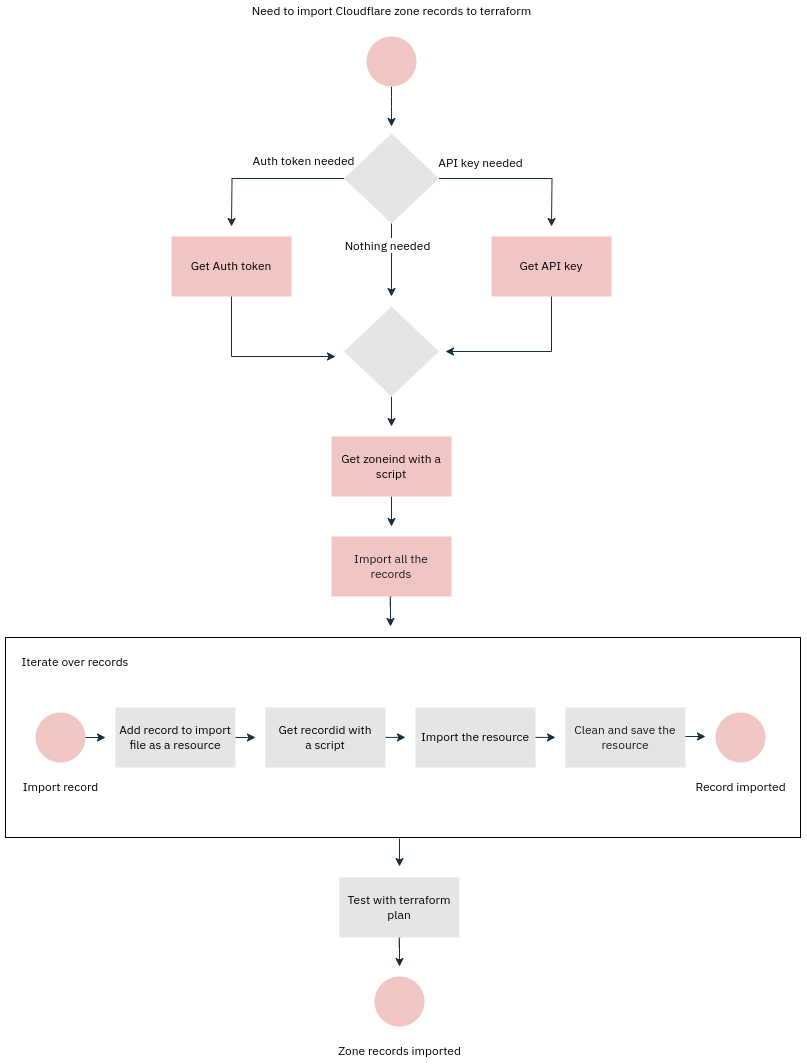
Computers were supposed to relieve us humans from boring and repetitive jobs. Here we turn this upside down and do the boring and repetitive job of a computer by importing Cloudflare DNS records to Terraform ourselves. Not fun, but someone’s gotta do it sometimes. If you’re reading this, that someone is probably you. Condolences. My hope is that someone lazy enough gets bored enough to write a program to do this. I didn’t. Yet.
Terraform, AWS Cloudfront and CNAMEAlreadyExists error
When you create a distribution, AWS creates several DNS A records with the same name (e.g. d25gma2ea3ckma.cloudfront.net) which point to IPs the distribution is using. Then, typically, you would define CNAME(s) pointing to that cloudfront.net address in your own DNS. Each Cloudfront distribution has a list of aliases, similar to Subject Alternative Names (“SAN”) in SSL certificates. The aliases should match the CNAME(s) you’ve set in DNS.
Now, this is all good until you need to migrate those Cloudfront distributions to, say, a new AWS account. If you attempt to create a new distribution (here with Terraform) with the same alias you will get this error:
Terraform, Azure and MissingSubscriptionRegistration
When deploying with Terraform to Azure you may sometimes encounter errors such as this:
╷
│ Error: creating Automation Account (Subscription: "83fa140a-2bea-175a-395c-914cae2902ce"
│ Resource Group Name: "production"
│ Automation Account Name: "backup-automation"): automationaccount.AutomationAccountClient#CreateOrUpdate: Failure responding to request: StatusCode=409 -- Or
iginal Error: autorest/azure: Service returned an error. Status=409 Code="MissingSubscriptionRegistration" Message="The subscription is not registered to use
namespace 'Microsoft.Automation'. See https://aka.ms/rps-not-found for how to register subscriptions." Details=[{"code":"MissingSubscriptionRegistration","mes
sage":"The subscription is not registered to use namespace 'Microsoft.Automation'. See https://aka.ms/rps-not-found for how to register subscriptions.","targe
t":"Microsoft.Automation"}]
The problem is that in Azure you may need to register the provider for the service you intend to manage with Terraform. If you add resources from Azure Portal this registration part is handled automation. In the above case the Azure Automation provider was missing.
Finding which MySQL/MariaDB tables are modified by a GUI
I was working with Keycloak realm private/public key automation and it was not immediately obvious where Keycloak stores the keys. Figuring it out was actually easy, and this method applies to any web application that uses MySQL/MariaDB, not just Keycloak.
Anyhow, on Ubuntu, you’d navigate to /var/lib/mysql/name-of-database. For example:
cd /var/lib/mysql/keycloakMake sure that no changes have been made recently (within one minute):
$ find -mmin -1Then go to the web application and change whatever you’re trying to locate from the database. Here I changed the Keycloak RSA key priority. Then run the find command again:
AWS: creating AMIs from EBS snapshots shared with you
In AWS EBS (“Elastic Block Storage”) is the underlying technology that (virtual) hard disks of your instances (virtual machines) use. You can take snapshots of those virtual hard disks and use those snapshots to, for example:
- Debugging issues with unbootable virtual machines: attach and then mount the snapshot on another virtual machine and investigate what is wrong.
- Creating AMI images from which you can launch new instances
- Sharing EBS volumes (between regions and AWS accounts), e.g. for purposes of migrating VMs
Here we’ll focus on the last use-case: being able to create copies of virtual machines on another AWS account. The reason why I even bothered writing this blog post is that most of the articles on the Internet do not cover this use-case: they assume you’re working within one AWS account and/or one region. The use-case covered here requires a few extra steps:
Joining nodes to FreeIPA using a non-admin user
Typically Linux nodes are joined to FreeIPA using admin credentials. While this works, it exposes fully privileged credentials unnecessarily, for example when used within a configuration management system (see for example puppet-ipa).
Fortunately joining nodes to FreeIPA is possible with more limited privileges. The first step is to create a new FreeIPA role, e.g. “Enrollment administrator” with three privileges:
- DNS Administrators
- Host Administrators
- Host Enrollment
Then you create a new user, e.g. “enrollment”, and join it to the “Enrollment administrator” role. After that you should be able to join nodes using that “enrollment” user.
Using .sync.yml in Puppet Development Kit (PDK)
Puppet Development Kit is probably the best thing since sliced bread if you work a lot with Puppet. It makes adding basic validation and unit tests trivial with help from rspec-puppet. It also makes it very easy to build module packages for the Puppet Forge.
That said, there is a minor annoyance with it: whenever you run “pdk update” to update PDK to the latest version, all your local changes to files such as .gitignore get destroyed, because PDK creates those files from PDK templates and any local changes are mercilessly wiped. Fortunately there is a way to sync your local changes to the files generated from the templates with .sync.yml. While .sync.yml is is pretty well documented, documentation is lots and lots of words with very few examples. So, here’s a fairly trivial .sync.yml example that ensures local changes to .pdkignore and .gitignore persist across PDK updates:
Use content of a file as a variable with Puppet
Every now and then a need to use the content of a file as a variable on an agent node arises. Here’s one way to do it with the help of a custom fact.
First create a custom fact on the puppet server:
Facter.add(:my_file_content) do
  setcode do
    path = "/path/to/my_file"
    File.read(path) if File.exist?(path)
   end
end
You can confine this to restrict it to be available only on selected nodes, for example: