Monitoring Azure with Prometheus

Introduction
Prometheus is a great tool for “cloud-native” metrics gathering and monitoring. It is particularly easy to manage with infrastructure as code methods. Prometheus can collect metrics from various sources, including Azure Monitor. You can use Azure Metrics Exporter to convert Azure Monitor metrics into Prometheus metrics, but doing so is definitely not trivial unless you’re pretty familiar with Prometheus, Azure Monitor and Microsoft Entra ID apps. This article tries to help you make monitoring Azure with Prometheus a breeze instead of a struggle. We won’t go into a lot of detail about Prometheus or Azure Monitor as there’s plenty of information available elsewhere about both of them. Also note that this article is about vanilla Prometheus, not Microsoft’s “Azure Monitor managed service for Prometheus”.
Avoid double taxation when selling to the U.S

Introduction
We sell digital products in AWS Marketplace, Azure Marketplace and Udemy - see our products page for detail. The end customers of our products are located around the world, including the Unites States of America. All the aforementioned platforms a located in the U.S. This means that they comply with the U.S. tax laws both on the state and federal level. Internal Revenue Service (IRS) is responsible for collecting the federal taxes, which are relevant for this article. Foreign (e.g. European) corporations that sell (digital) products or services to U.S. customers need to prove to IRS that it should not withhold federal taxes from the income coming from U.S. end customers. The goal of this article is to help European corporations (companies) avoid double taxation: first by the IRS and then by the tax office of its own home country. We have all the basic information that a typical European corporation (company) needs to do to avoid double taxation when selling services or digital products to U.S. end customers.
Microsoft Entra ID multi-factor authentication in RDP

Introduction
Microsoft Entra ID, formerly known as Azure Activate Directory (AAD), is replacing classic on-premise Active Directory installations slowly but surely. It replaces “legacy” protocols such as LDAP and Kerberos with “modern” protocols such as SAML, OIDC and OAuth2. However, the client-side support in various operating systems such as Windows, Linux and MacOS is spotty, to say the least. You can make things work, but only if the stars (or rather, bits) are aligned just right. This article explains how multi-factor authentication in RDP works with Azure VMs when using Microsoft Entra ID. Note the emphasis on MFA: without MFA you can make logins with Entra ID work more easily by using the normal username + password authentication in RDP.
Using Hiera with Ansible

Introduction
Hiera is a very powerful “key-value configuration data lookup system” used mainly, but not exclusively, with the Puppet configuration management and orchestration system. In Hiera data is stored in in yaml files in, as the name implies, a hierarchy or set of prioritized levels. A typical Hiera lookup goes through the hierarchy starting from the highest-priority level and stops when it finds a match. That match could come from a node yaml file, a deployment (e.g. production or staging) yaml file or from site-wide yaml. What this essentially means is that you can define common, site-wide parameters at the lowest level of the hierarchy and override those when needed at higher levels. How does Hiera and Ansible work together, then? The short answer is “they don’t, really”, but the long answer is more complex than that.
RHEL on Upcloud

Introduction
Upcloud is a Finnish Cloud provider that focuses on high-quality services. There is no built-in support for installing RHEL on Upcloud, which is quite typical of “small Clouds”. Sometimes you don’t want to use clones (e.g. Rocky Linux) and need real RHEL instead. This is where this article comes handy, as the RHEL installation process in Upcloud is far from trivial. This article focuses on RHEL 9, but the process may work with older and newer versions as well. The process I describe here applies almost 1:1 to any Linux operating system Upcloud does not natively support.
Buildbot build order: how to run certain builds before others?
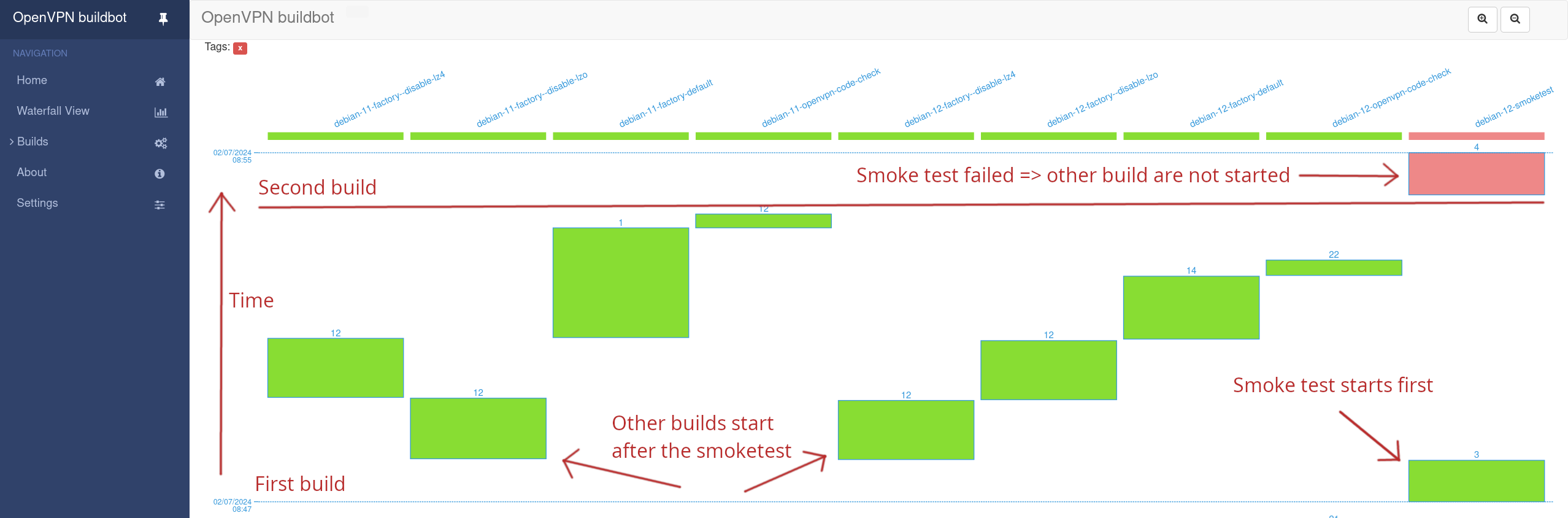
Introduction
The mechanisms for configuring Buildbot build order is documented fairly well. However, what that documentation lacks is a centralized place where ordering is explained. My personal goal was to run smoke tests first and if those don’t pass then cancel all other build requests. That seemed straightforward, but turned out not to be so. There were many, many ways that could in theory be achieved, but most of those did not work at all, or worked only partially. This article attempts to fill the “how do I order builds in Buildbot” gap, including what can and can’t be achieved with each strategy.
Install RHEL 9 on Hetzner Cloud

Scaling a mountain is about as easy as to install RHEL 9 in Hetzner Cloud in scalable way. At minimum, you need this article and lots of endurance to pull it off. Photo credit.
Introduction
Hetzner Cloud is a really good “small” Cloud with particularly good value for money. While it does not have hundreds of services like AWS or Azure, but it has most of the basic stuff. Hetzner cloud has built-in support for Red Hat Enterprise Linux (RHEL) clones such as Rocky Linux 9. However, you cannot spin up real RHEL 9 instances without spending some time on it. This article will give you all the details you need to install RHEL 9 on Hetzner Cloud. We do that in a way that you can reuse your RHEL 9 installation to spin up multiple servers from one snapshot. This way you don’t have to run the RHEL installer for every RHEL server you want to spin up.
Blackbox Exporter ICMP module and selinux

Blackbox Exporter ICMP module and selinux do not like each other. Same goes for systemd units and ICMP Echo sockets. However, with persistence, skill and a bit of luck you can make it all work together. Photo credit.
Introduction
Blackbox Exporter is an exporter for the Prometheus monitoring system. It is able to probe a target, such as a host or an application from the outside. Blackbox Exporter does probing with modules such as http, tcp, dns, icmp and grpc (details here). The icmp module is special because it does privileged operations that require the CAP_NET_RAW capability and as well as custom selinux policies. This article aims to explain how you can make Blackbox Exporter ICMP module and selinux work together. NOTE: you do not need any of these tricks if you use non-icmp Blackbox exporter modules.
How to reduce RDS storage size in an automated way

Introduction
Amazon RDS is a relational database service available on Amazon Web Services. It is essentially a managed database server with a volume for the data. Both cost money. Having a large dataset is not the only reason have big volume: the volume size determines the number of I/O operations (IOPS) the volume can do. If you have high load on your RDS instance you may very well run out of IOPS which can result in a disaster. Scaling up the volume size is easy to avoid such disasters, but it is much more difficult to reduce RDS storage size. This is because downsizing RDS storage size is not officially supported by AWS. If the load on your RDS instance goes down (e.g. due to refactoring), you may end up having a database with an oversized volume that costs lots of money for no reason.
Downsize AWS RDS Volume

It is trivial to downsize an AWS RDS instance. It is equally trivial to upsize AWS RDS volumes. However, to downsize AWS RDS volume you need to jump through lots of hoops.
So, why would you ever want to downsize an AWS RDS volume? One reason might be that you increased the volume size simply to get more burst credits for the volume. Then you did refactoring that reduced the need to have that many credits and want to save money. Or maybe you genuinely had a huge amount of data on your RDS instance volume, removed some of it but got stuck with a huge volume.