Debugging Terraform AWS UnauthorizedOperation errors

Causes for the Terraform AWS UnauthorizedOperation errors
Terraform is an infrastructure as code tool you can use to configure Cloud resources in AWS. When using Terraform AWS provider you frequently run into various UnauthorizedOperation errors when creating, modifying or deleting resources. That happens unless you do what you should not do and let Terraform use an AWS API key tied to an IAM user with full admin privileges. In almost all cases Terraform UnauthorizedOperation errors are caused by missing IAM permissions. It can sometimes be a bit tedious to get to the root cause, because Terraform may not show it in its normal output.
Terraform downloads the deprecated azure provider
You are 100% sure that all your Terraform resources are using terraform-provider-azurerm, yet Terraform attempts to download the deprecated “azure” provider:
$ terraform init
Initializing modules...

Initializing the backend...

Initializing provider plugins...
- Finding hashicorp/local versions matching "2.2.3"...
- Finding latest version of hashicorp/azure...
- Finding hashicorp/azurerm versions matching "3.17.0"...
- Installing hashicorp/local v2.2.3...
- Installed hashicorp/local v2.2.3 (signed by HashiCorp)
- Installing hashicorp/azurerm v3.17.0...
- Installed hashicorp/azurerm v3.17.0 (signed by HashiCorp)
╷
│ Error: Failed to query available provider packages
│
│ Could not retrieve the list of available versions for provider hashicorp/azure: provider registry registry.terraform.io does not have a provider named
│ registry.terraform.io/hashicorp/azure
│
│ Did you intend to use terraform-providers/azure? If so, you must specify that source address in each module which requires that provider. To see which
│ modules are currently depending on hashicorp/azure, run the following command:
│     terraform providers
╵
You grep the state file and find no references to the “azure” provider. You assume that the cause is some nested module that depends on it, but no, that’s not it. You run “terraform providers” and see that indeed, the “azure” provider is required:
Importing DNS records from Cloudflare to Terraform
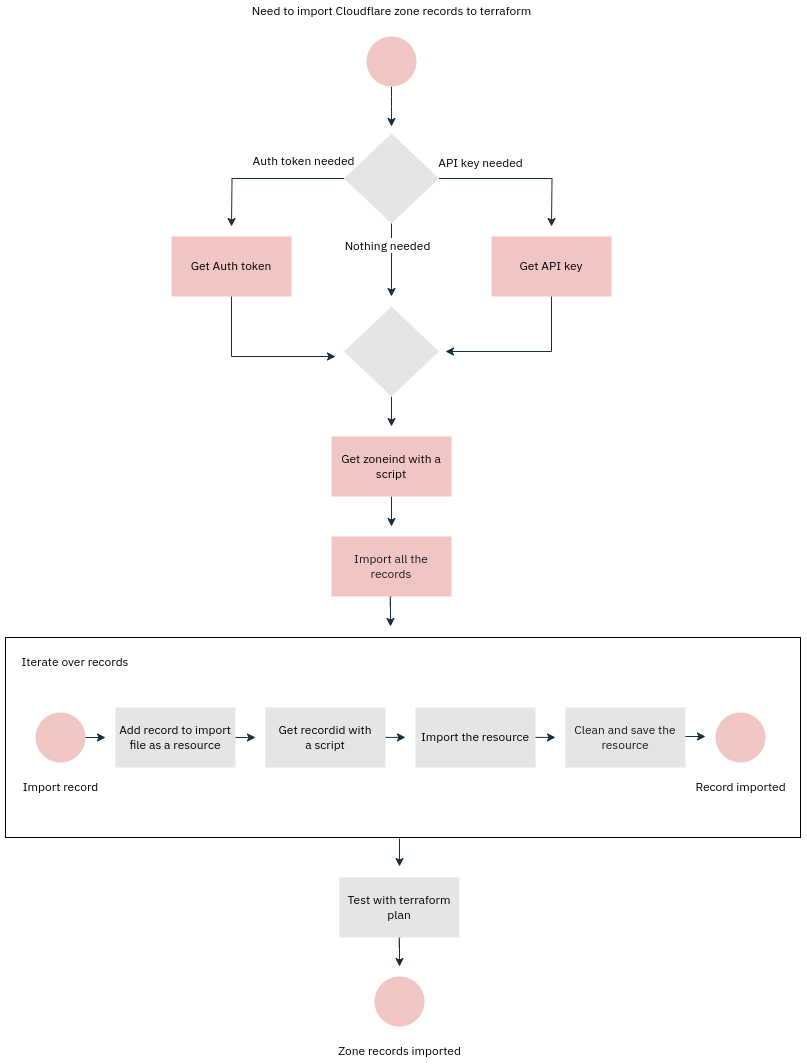
Computers were supposed to relieve us humans from boring and repetitive jobs. Here we turn this upside down and do the boring and repetitive job of a computer by importing Cloudflare DNS records to Terraform ourselves. Not fun, but someone’s gotta do it sometimes. If you’re reading this, that someone is probably you. Condolences. My hope is that someone lazy enough gets bored enough to write a program to do this. I didn’t. Yet.
Terraform, AWS Cloudfront and CNAMEAlreadyExists error
When you create a distribution, AWS creates several DNS A records with the same name (e.g. d25gma2ea3ckma.cloudfront.net) which point to IPs the distribution is using. Then, typically, you would define CNAME(s) pointing to that cloudfront.net address in your own DNS. Each Cloudfront distribution has a list of aliases, similar to Subject Alternative Names (“SAN”) in SSL certificates. The aliases should match the CNAME(s) you’ve set in DNS.
Now, this is all good until you need to migrate those Cloudfront distributions to, say, a new AWS account. If you attempt to create a new distribution (here with Terraform) with the same alias you will get this error:
Enabling Azure Backup on Linux VMs with Terraform
This article shows you how to enable Azure Backup on Linux VMs. It is recommended to read the Understanding Azure Backup for Linux VMs article first before trying to enable backups with Terraform. Terraform AzureRM provider has three relevant resources:
- azurerm_linux_virtual_machine: parameters provision_vm_agent and allow_extension_operations should be true or enabling backups will fail (with or without Terraform)
- azurerm_virtual_machine_extension: this can be used to run/enable a VM extension on a VM
- azurerm_backup_protected_vm: this resource enables backups on a VM
- azurerm_recovery_services_vault: the recovery services vault where backups will be stored
- azurerm_backup_policy_vm: backup schedule and retainment rules
I’ll go through the basic process first, which may work for some people. I’ll then take a deep dive into the timeout issues you may or may not encounter in your environment.
Terraform: converting an aws_instance network interface into an explicitly managed interface
The aws_instance resource in Terraform can automatically create the default network interface for you. There are cases, however, when you notice that the default network interface is not enough anymore, and modifying it via the limited aws_instance parameters is not sufficient. In these cases you can convert the interface into an aws_network_interface resource, but the process is far from straightforward.
The first step is to create a Terraform resource for the network interface:
Terraform, Azure and MissingSubscriptionRegistration
When deploying with Terraform to Azure you may sometimes encounter errors such as this:
╷
│ Error: creating Automation Account (Subscription: "83fa140a-2bea-175a-395c-914cae2902ce"
│ Resource Group Name: "production"
│ Automation Account Name: "backup-automation"): automationaccount.AutomationAccountClient#CreateOrUpdate: Failure responding to request: StatusCode=409 -- Or
iginal Error: autorest/azure: Service returned an error. Status=409 Code="MissingSubscriptionRegistration" Message="The subscription is not registered to use
namespace 'Microsoft.Automation'. See https://aka.ms/rps-not-found for how to register subscriptions." Details=[{"code":"MissingSubscriptionRegistration","mes
sage":"The subscription is not registered to use namespace 'Microsoft.Automation'. See https://aka.ms/rps-not-found for how to register subscriptions.","targe
t":"Microsoft.Automation"}]
The problem is that in Azure you may need to register the provider for the service you intend to manage with Terraform. If you add resources from Azure Portal this registration part is handled automation. In the above case the Azure Automation provider was missing.
Modern cronjob part 1: Azure Automation with Terraform
Microsoft Azure has a nice service for scheduling tasks called Azure Automation. While Azure Automation is able to other things as well, such as being able to act as a Powershell DSC pull server, we’ll focus on the runbooks and scheduling. Runbooks are scripts that do things, e.g. run maintenance and reporting tasks. Runbooks often, but not necessarily manipulate objects in Azure. Runbooks are serverless like Azure Functions and the pricing is therefore similar - you pay for the amount of computing resources you use and don’t have to pay for a server that’s mostly idle.
Multi-part cloud-init provisioning with Terraform
Cloud-Init is “a standard for customizing” cloud instances, typically on their first boot. It is allows mixing state-based configuration management with imperative provisioning commands (details in our IaC article). By using cloud-init most of the annoyances of SSH-based provisioning can be avoided:
-
Having to use (possibly shared) SSH keys for provisioning
-
Having to have direct network access to the VM being provisioned (may require a VPN connection)
That said, neither cloud-init itself, nor its use within Terraform is particularly well documented. Therefore it can be an effort to create cloud-init-based provisioning that works and adapts easily to different use-cases. This article attempts to fill that gap to some extent.
Data-driven Terraform: Kubernetes cluster in Hetzner Cloud
Terraform does not have a particularly strong decoupling between data and code, at least not from a best practices perspective. It is possible and useful, however, to use data to define Terraform resources - if not for any other reason but to reduce code repetition for common resources that require defining lots of parameters. Here’s an example of setting up a Kubernetes cluster in Hetzner Cloud using Terraform with a “data-driven” approach: